How to Write a Gym Website That Converts Visitors to Members
Click Below To Share & Ask AI to Summarize This Article
Most Gym Websites Lose Members Before They Ever Walk In
A prospective member who finds your gym — through a Google search, a social media post, or a referral — will visit your website before they visit your gym. What they find there determines whether they enquire or leave. Yet most independent gym websites answer the wrong questions, bury the information people actually need, and make it harder than necessary to take the next step. provide third-party validation that you cannot give yourself. Visitors who would not join based on your own claims will join based on other members’ experiences.
Audit your website against these five questions right now. If any of them require more than 10 seconds to answer, you have a conversion problem on that page.
The Pages Every Gym Website Needs
Home page
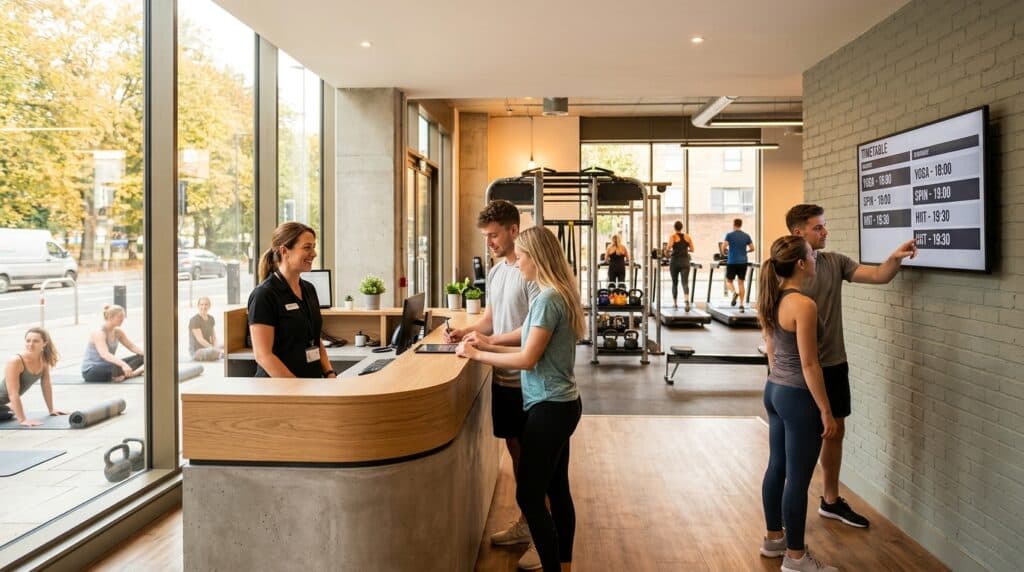
Your home page has one job: convince a first-time visitor to keep reading or take an action. It needs: your gym name and location in the headline, one sentence describing what makes you different, a photo or short video of your gym floor or a class in action, your primary call to action (free trial booking), and social proof (star rating with review count, or 2–3 short testimonial quotes).
What to avoid on the home page: a wall of text, a slideshow of stock photography, a lengthy paragraph about your history, or a navigation menu so long that visitors cannot decide where to go. Every element on the home page should serve the goal of getting the visitor to either learn more or book a trial.
Membership and pricing page
This is the most visited page on most gym websites after the home page. It must clearly show your membership options, prices, and what is included in each. Present tiers from most to least comprehensive (not cheapest first — see the anchoring principle in the pricing guide). Include a specific call to action on this page: “Join now” or “Book a free trial” with a direct link to the relevant form.
If you have a minimum contract term or joining fee, state it clearly. Discovering unexpected costs at sign-up is the most common trigger for abandonment at the final step.
Classes and timetable page
If you run group classes, a current, accurate timetable is essential. An outdated timetable (showing classes that no longer run, or missing new additions) damages trust immediately. Embed a live timetable from your gym management software if possible — this removes the need to manually update a static page.
Include brief descriptions of each class type. “HIIT” tells a prospective member the format but not whether they would enjoy it or be able to keep up. A two-sentence description of the class structure and who it suits converts better than a class name alone.
About and team page
People join gyms partly because of the people who run them. A team page with photos, brief bios, and qualifications of your coaches personalises the gym before the first visit. This page also handles the “Is this gym run by people I’d want to be coached by?” question that most visitors are asking implicitly.
Contact and trial booking page
This is your conversion page — the destination of every call to action across your site. It must be as frictionless as possible:
- A short form (name, email, phone, optionally “what are you looking to achieve?”) that takes under two minutes to complete
- Clear confirmation of what happens next after they submit (“We’ll contact you within 24 hours to arrange your free trial”)
- Your phone number and email for visitors who prefer direct contact
- Your address with an embedded Google Map
- Opening hours
Call to Action Placement: More Is More
A call to action (CTA) button should appear multiple times on every page — not just once at the bottom. A visitor who is convinced after reading your first paragraph should not have to scroll to the bottom to find out how to book a trial. Place your primary CTA in:
- The navigation bar (a persistent “Book a free trial” button that stays visible as you scroll)
- The hero section of the home page (above the fold, immediately visible)
- After each major section of the page (after pricing, after class descriptions, after testimonials)
- The footer of every page
Your CTA button colour should contrast clearly with your site background — if your site is white, a green or dark button stands out; a white button on a white background is invisible. This sounds obvious; a significant number of gym websites make exactly this mistake.
Social Proof: What to Include and Where
Social proof elements significantly increase conversion rates because they provide third-party validation that your own claims cannot. Include on your website:
- Google review widget or manually curated reviews — show your star rating and a selection of recent reviews. Google review widgets that pull live data are available as WordPress plugins and web embeds. If you cannot integrate them dynamically, manually add 6–10 of your best recent reviews and update them quarterly.
- Member photos with consent — real members in real training environments. “Before and after” content with explicit consent, or simply photos of members attending classes and looking engaged.
- Membership numbers or longevity signals — “500+ members”, “established since 2014”, “10 years in [town]” are credibility signals that cost nothing to add.
Mobile Performance: Non-Negotiable
More than 60% of gym website visits come from mobile devices. A website that looks good on a desktop but loads slowly or displays incorrectly on a phone is losing more than half its visitors. Check your site on a phone right now — can you find the trial booking button within five seconds? Does the timetable display correctly? Do forms fill easily on a mobile keyboard?
Page load speed also affects both user experience and Google search ranking. Use Google’s free PageSpeed Insights tool (pagespeed.web.dev) to check your site’s mobile score. Scores below 50 indicate significant performance problems. Common causes: oversized images (compress all images to under 200KB), too many plugins (WordPress sites especially), or hosting on a slow shared server.
Tracking Whether Your Site Is Converting
A website you cannot measure is a website you cannot improve. The minimum tracking setup:
- Google Analytics 4 — free, tracks visitor numbers, traffic sources, and which pages people visit. Takes 15 minutes to set up via Google Tag Manager.
- Goal tracking — configure a conversion goal for your trial booking form submission. This tells you your trial booking conversion rate (visitors to form submissions) and which traffic sources (Google organic, social media, direct) are driving the most bookings.
- Google Search Console — shows which search terms your site appears for, your average position, and your click-through rate. Essential for understanding SEO performance.
The key metric to track monthly: conversion rate from visitor to trial booking submission. For a well-optimised gym website, 2–5% of visitors submitting a trial booking is a reasonable target. Below 1% indicates significant conversion problems worth addressing.
Your Website Is Your 24-Hour Sales Tool
Every person who searches for a gym in your area and finds your website is a potential member. A site that clearly answers their questions, builds trust through social proof, and makes booking a trial simple converts that search traffic into real enquiries — without any additional advertising spend.
GymPal drives additional gym-seeker traffic directly to your listing, complementing your own website. Claim your free GymPal listing and ensure that every prospective member in your area has a clear path to finding you.

I am Adam Hall, a dedicated fitness professional with over ten years of experience in the UK’s fitness industry. I earned my Master’s degree in Sports Science from Loughborough University and have worked with several top fitness studios across the UK. My certifications include a Level 3 Personal Trainer Certificate and a specialised Strength and Conditioning Coach accreditation.
Starting my career as a personal trainer, I quickly moved up to manage multiple gym locations, overseeing their operations and training programs. Beyond managing gyms, I regularly contribute to well-known fitness magazines and have been featured in articles for “Health & Fitness” and “Men’s Health”. My passion also extends online where I run a popular blog on GymPal’s AI-powered directory platform detailing insights into choosing the right fitness venues across the UK. With hundreds of posts reaching thousands of readers monthly, my goal is to influence positive changes in how people approach health and exercise throughout the country.